how we built Travolp's MCP server: 115 tools, two hosts, one rule
Two MCP servers, 115 tools and three widget types, built as a thin facade over the API we already trust. The decisions that made it tractable, what we hide and strip on purpose, and the consent lesson security review handed us.
Travolp is our AI travel companion: it builds an itinerary, then travels with you. We exposed trip planning, shared expenses, hotel offers, travel data and agency operations through the Model Context Protocol. Travellers can work with these capabilities inside Claude or ChatGPT; hotel booking and eSIM checkout still require an explicit handoff to the purchase flow.
The implementation snapshot reviewed on September 7, 2026 has two MCP servers, one OAuth gated and one public: 115 authenticated tools, 67 visible to consumers and 48 additional staff-only tools, plus 12 public tools. Three widget types cover trips, hotel offers and eSIMs. The same server-side registrations support both hosts; users configure a connection in each host.
This post is about the decisions that made that tractable. The position we ended up with, and will defend here: your MCP server should be a thin facade over the API you already trust, and most of the real engineering is subtraction. What you strip from responses, what you hide from the tool list, and what you refuse to render matters more than what you add.
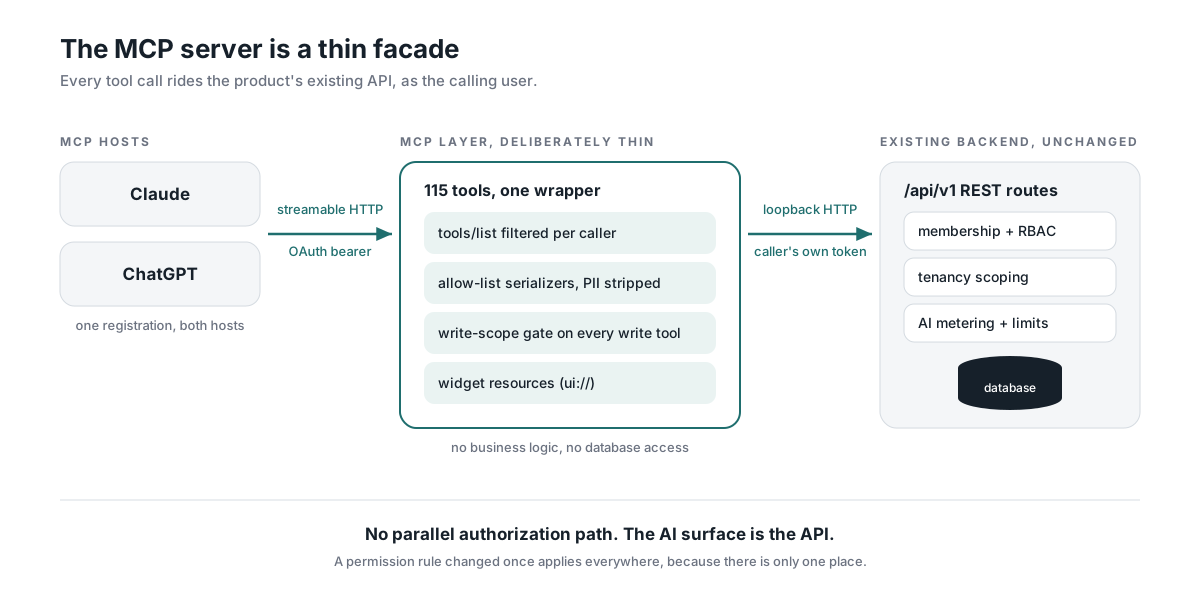
reuse business authorization
Authenticated business operations call existing /api/v1/* REST endpoints over loopback HTTP, forwarding the caller’s OAuth bearer token. The shared HTTP helper builds these headers:
const headers: Record<string, string> = {
  Authorization: `Bearer ${ctx.bearer}`,
  Accept: "application/json",
  // Creation-provenance marker: routes that record Trip.createdVia read
  // this to distinguish connector-created rows from manual creates.
  "X-Travolp-Created-Via": "mcp",
};
A handler can be short because registration, schemas and shared request handling live elsewhere. This is the get_trip handler, with its endpoint call and response projection:
async (args, ctx) =>
  tripView(await apiFetch(ctx, { path: `/api/v1/trips/${enc(args.tripId)}` }), ctx.origin),
Membership checks, role checks, tenancy scoping and metering continue to run in the REST routes. The HTTP helper also forwards tenant context where needed, serializes request bodies, handles errors and unwraps JSON before returning data to the projection.
The MCP layer has additional responsibilities: tool visibility, response projection and connector consent. Its audience resolver reads memberships directly, and its write-scope gate adds a connector-specific check. Reusing business authorization does not mean there is no MCP-specific logic.
The cost is an additional HTTP call and a dependency on the existing API’s shape and availability. For this product, those costs are easier to manage than a second implementation of trip and expense operations. We have not attached a latency claim to that tradeoff without a benchmark.
stateless transport and request-scoped visibility
The authenticated entry point is a Next.js route. We use mcp-handler for Streamable HTTP with its legacy SSE transport disabled. That setting is separate from the application SSE stream used by mobile chat:
// We run a long-lived Node server, so streamable HTTP works
// statelessly without a Redis-backed session store.
const mcpHandler = createMcpHandler(
  (server) => { registerTravolpTools(server); },
  { serverInfo: { name: "travolp", version: "1.0.0" },
    instructions: TRAVOLP_MCP_INSTRUCTIONS },
  { basePath: "/api", disableSse: true, maxDuration: 300 },
);
The handler re-runs tool registration on each request, allowing visibility to use that request’s resolved audience without a transport session store. Audience lookup has its own short-lived cache, so visibility is not necessarily fresh after a role change. Authorization still runs at the API on each operation.
OAuth without writing an OAuth server
We used Clerk as the OAuth 2.1 authorization server (PKCE, dynamic client registration) and kept our side to two jobs: publish discovery metadata and verify tokens. Two production realities cost us real time and are worth writing down.
First, if you run behind a platform proxy, the resource value you advertise in the protected-resource metadata gets derived from the request URL, and the request URL inside the proxy is your internal bind address. Strict clients validate token audience against that value (RFC 9728 and RFC 8707), so you must rebuild the request from the forwarded public host before answering.
Second, clients do not discover metadata the same way. Claude follows the WWW-Authenticate: resource_metadata pointer your 401 returns. ChatGPT instead derives the path-inserted form from the server URL itself, inserting the well-known prefix before the path (RFC 9728 section 3.1). If you only serve the root document, ChatGPT fails with a generic “problem connecting” and nothing in your logs tells you why. Serve both shapes.
115 tools is a haystack, not a menu
A travel agency admin needs tour authoring, CRM, bulk import and storefront tools. A traveller does not need those 48 staff-only tools. Filtering reduces the choices presented to the assistant. The audience resolver performs an indexed membership read on a cache miss, caching the result for 60 seconds by user ID rather than rotating OAuth token. It passes the result through AsyncLocalStorage, and the tool wrapper applies the visibility filter:
if (config.audience === "staff" && currentToolAudience() === "consumer") {
  tool.disable();
}
The resolver fails open to the full list. This is a presentation choice: downstream REST authorization still rejects operations the caller cannot perform. The fallback does expose extra tool descriptions and can produce confusing failed calls. That is a cost we accept here, not a reason to treat fail-open behaviour as a general rule. Tests pin the advertised lists to catch accidental changes.
one tool layer, two front doors
The same 115 tools also power the in-app agency assistant. Rather than registering them twice, the assistant hands the registration function a Proxy standing in for an MCP server, and records what gets registered instead of serving it:
const stub = () => undefined;
const server = new Proxy({} as McpServer, {
  get: (_target, prop) => (prop === "registerTool" ? registerTool : stub),
});
Reusing registration avoids a second set of tool definitions. Each call carries a surface marker, connector or dashboard; missing or unexpected values default to the scrubbed connector surface. Only the in-process collector stamps dashboard. A self-declared OAuth client identity is not evidence that a caller is our trusted application.
This reuse applies to the agency assistant. Consumer mobile chat posts to /api/v1/chat, which runs its own application tool loop and emits typed SSE events. Kotlin maps those events into Compose hotel cards, eSIM offers and place suggestions. The phone does not consume the external MCP widgets directly. Shared product capabilities do not imply identical transport, tool registries or UI implementations.
serializers, not rows
Authorization is only the first check. Tool results go to an external assistant and may appear in a shared conversation. Sensitive responses therefore use explicit projections that keep fields needed for the task and remove others. Examples include participant emails, booking references and confidential commercial fields. A display name can itself contain an email fallback, so checking only field names misses that case.
The trip projection exposes bookingConfirmed rather than a hotel booking reference, which can be used in reservation-management flows. eSIM activation credentials are excluded from model-facing offers and ownership summaries; the traveller installs the profile through the app.
Two staff tools were removed from the MCP surface: supplier records carrying contacts and confidential rates, and the agency-wide booking list carrying buyer and payment details. Removing those paths reduces the sensitive surface that needs ongoing review. The remaining projections still need checks as API responses evolve.
the prompt is part of the API
The least glamorous file in the module might be the most important one: about a hundred lines of server instructions the host feeds to the model at initialize, plus tool descriptions that carry behaviour, not just parameters. Three examples that each trace back to a real incident:
create_tripsays, in its own description, that it is for brand-new trips only, and that editing an existing trip meanslist_tripsthen edit in place. Before that sentence, models asked to change a trip would sometimes create a duplicate.- Invite tools warn that every call sends a real email, so a model must never retry one on a timeout.
get_triptells the model its card stays live and updates itself, so do not call it again to re-show a trip. Before that, hosts stacked one persistent card per call and conversations filled with them.
Descriptions guide model behaviour. We can revise one, replay the scenario and check whether the failure recurs. They do not enforce authorization, prevent prompt injection or guarantee safe retries. Those guarantees need server-side controls.
tools that return UI
For results that deserve better than JSON, we ship three widgets on the MCP Apps standard (io.modelcontextprotocol/ui): the trip itinerary with inline editing and a live generating state, hotel picks per city with a choose-then-book flow, and our eSIM catalogue with a data meter. The tool metadata carries both the standard keys and the openai/* aliases, so one registration renders in both hosts.
The build is deliberately primitive. esbuild bundles each widget (React included) to a single string, inlines the CSS, and emits one self-contained HTML document per widget, because the host sandbox blocks external scripts entirely. The resource URI embeds a content hash, ui://travolp/trip.<hash>.html, because hosts cache widget templates by URI and a stable URI serves a stale bundle after a deploy. Image hosts must be listed in the widget CSP, and an unlisted host does not error; it renders a silently blank card. And anything minted per use, like a single-use booking link or a payment URL, goes straight to the host’s link opener and never into widget state.
We keep rendering selective. A card after every operation would fill the conversation with repeated UI. The three widget types are attached where they help the user inspect a result or follow its progress, including the itinerary generation flow. Tool metadata chooses those placements explicitly.
The hotel offers use Nuitee’s LiteAPI integration, and travel-data offers use eSIM Access. Thanks to both teams for the platforms behind those flows, and to Tekai for review and feedback on the architecture. Rendering an offer does not book a room or purchase a pack; fresh booking and checkout requests follow the traveller’s explicit action.
consent is not authorization
The sharpest lesson came from security review rather than feature work. With open dynamic client registration, any client can register and request the basic identity scopes. Our API accepted a valid token without inspecting scopes, so the granted scope did not bound capability: a connector a user approved believing it read their profile could, in principle, drive every write tool as that user. The consent screen was truthful about identity and silent about capability.
We implemented a gate in the tool wrapper, but enforcement remains disabled pending scope provisioning and connector migration. When enabled through MCP_WRITE_SCOPE, it requires a separately consented write scope for external calls to tools not marked read-only. The core check is shown below; the error construction is abbreviated:
if (!isWrite || !requiredScope) return null;
if (authInfo?.extra?.surface === "dashboard") return null;
if ((authInfo?.scopes ?? []).includes(requiredScope)) return null;
return new McpApiError("WRITE_SCOPE_REQUIRED", ..., 403);
The read/write split reuses our own tool metadata: readOnlyHint !== true selects calls requiring the scope check. Missing metadata therefore counts as a write. Sharing that classification avoids a second list, but a mistakenly read-only annotation can still bypass the intended gate. Its accuracy needs review against actual behaviour.
For hosts, annotations remain hints that may inform confirmation prompts, not enforcement guarantees. Here, enforcement comes from our server’s scope check when enabled. The rejection tells the user to reconnect and approve the write permission; the trusted in-process dashboard surface is exempt from this connector-specific gate.
Enabling the gate removes write access from existing external connectors whose tokens lack the new scope until their owners reconnect and approve it. That requires a migration and user communication. Until enforcement is enabled, the additional write-consent restriction is not active. The consent screen, token scopes and server checks need to be reviewed together.
what we would do differently
We would check output schemas against representative API responses earlier. A field declared as a list of objects while the endpoint returned a list of strings caused result validation to fail. Loosening evolving inner fields can ease compatibility, but making every field optional also hides broken contracts. The useful boundary is explicit: validate stable fields that consumers depend on, and allow flexibility where the payload genuinely varies.
We would also test both discovery URL shapes before the first host connection and build replay scenarios around consequential tool choices. Descriptions need iteration alongside model and host behaviour; an initial wording is not a permanent fix.
The next article follows these capabilities into the mobile app: Kotlin Multiplatform module boundaries, the native Mapbox background, camera-update performance and streamed chat cards. The LinkedIn companion is part three of the ongoing build series; the mobile piece follows next week.
Priorli designs and builds production AI systems, including MCP servers like this one. If you want your product usable from Claude and ChatGPT, we can help: hello@priorli.com.